End the High Holiday Seating Scramble
Design 2D sanctuary layouts, visually assign seats without double-booking, and manage High Holiday seating without paper charts — saving Executive Directors 40+ hours of seating chaos.
Eliminate Seating Chaos and Paper Charts
High Holiday seating is traditionally the year's biggest administrative bottleneck — Executive Directors stuck balancing dues standing, family requests, and legacy seat preferences by hand across paper charts.
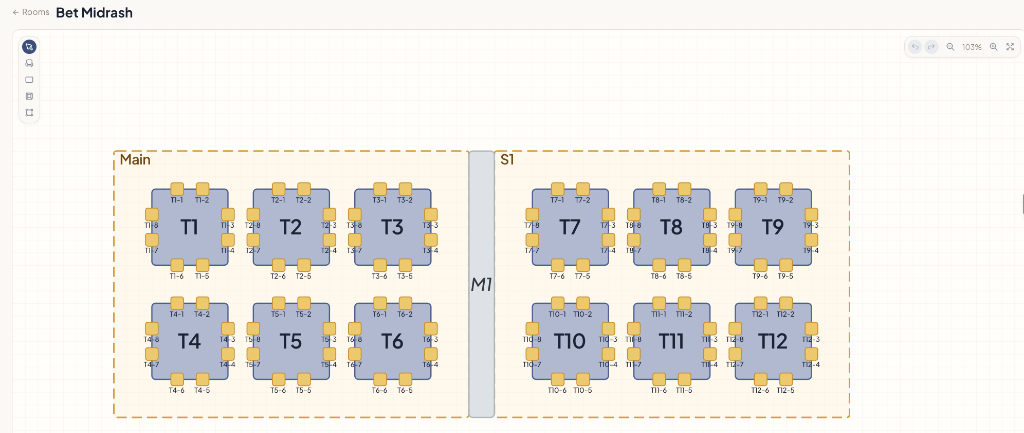
Makomly provides an intuitive 2D visual room builder. Admins can easily design sanctuary layouts, assign seats without double-booking, and maintain full control over legacy family placements with zero friction.
How the Seating Layout Flow Works
Design Rooms
Map rows, columns, section boundaries, and bimah locations dynamically using the layout tool.
Assign Tiered Pricing
Set ticket rates based on seating sections, family memberships, or age categories.
Book Instantly
Members select seats online or admins assign them in the backoffice. Updates reflect instantly.
Ensure Family Proximity and Honor Allocations
Automatically group family members so households sit together. Admins retain control to lock rows for board members, donors, or guests before general sales begin.
Visualizer Capabilities
Drag-and-Drop Editor
Create customized room layout shapes, circular tables for galas, or rows for lecture seating.
Member Status Filtering
Color-code seats on the admin map by membership status, outstanding balances, or guest types.
Historical Seat Imports
Import database configurations from previous years to preserve traditional seating priorities.
Book a 15-Minute Call
See how Makomly runs your events, seating, and dues collection — and reconciles every payment to the right member in QuickBooks automatically. No migration, no double-entry.